

Dubai is an incredible hub for businesses, attracting entrepreneurs and professionals from across the globe. If you’re planning to start a company here or already have one, choosing the right bank is a crucial step. Your money matters, and it’s essential to ensure that your funds are safe and easily accessible for both personal and business needs.
Among the options available, Wio Bank has emerged as a leading choice for many entrepreneurs. In this guide, I will dive deep into why Wio is trusted, how to set up an account, and everything you need to know to make an informed decision.
Tip: Use GenZone’s referral code “C094” for VIP onboarding and free assistance. Use this link to open a Wio bank account with our referral code.
If you want to watch a video on the same topic by our co-founder Kevin McKenzie, here’s the YouTube video for you:
Why Wio Bank?
Wio Bank is not just another digital bank; it’s a revolutionary platform tailored for modern entrepreneurs and businesses. Here are the key reasons why Wio stands out:
1. Backed by Reputable Organizations
Wio Bank is not a standalone entity. It’s supported by some of the UAE’s most trusted institutions:
- 10% owned by First Abu Dhabi Bank (FAB): One of the UAE’s largest banks, ensuring compliance and operational excellence.
- 25% owned by e& (Etisalat): A major telecommunications provider in the UAE.
- 65% owned by ADQ (Abu Dhabi Development Company): A significant investment entity under Abu Dhabi’s government.
This strong backing makes Wio Bank one of the most secure digital banks in the region.
2. Award-Winning Service
Wio Bank recently won the “Digital Bank of the Year” award at a prestigious Entrepreneur event in Dubai. This recognition highlights their commitment to innovation and customer satisfaction.
3. Versatility
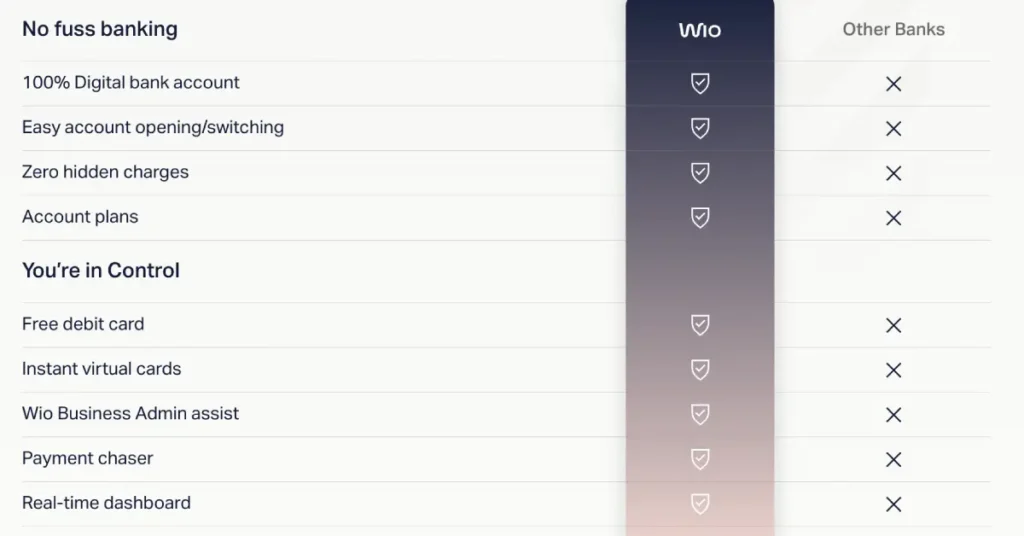
Whether you’re setting up a personal or business account, Wio offers solutions tailored to your needs. With support for multiple currencies (AED, USD, EUR, and GBP), it’s ideal for businesses dealing with international clients.
4. User-Friendly Digital Platform
Wio’s app makes managing your finances straightforward and efficient. From transferring funds to tracking expenses, the app is designed with simplicity in mind. Unlike traditional banks, WIO is 100% app-based, which means:
- No need to visit branches
- Fast account approvals
- Clean, intuitive UI
- Smart expense tracking
- Multi-currency IBAN accounts
Is Wio Bank Safe?
A common concern about digital banks is their safety. Let’s put those worries to rest:
- Government Backing: Wio Bank is essentially government-owned, thanks to its ties with FAB and ADQ.
- Secure Transactions: Advanced encryption and security measures ensure your data and money are always protected.
- Proven Track Record: After setting up over 400 Wio accounts for businesses, our clients have had zero complaints about security or reliability.
Who Can Open a WIO Business Account?
WIO is designed for:
- UAE-based Free Zone and Mainland businesses
- Sole proprietors and freelancers
- Startup founders
- Expats with valid UAE residency and Emirates ID
Business Types WIO Supports:
- Sole proprietors or individuals with sole authorisation to open and operate a bank account for their company.
- Businesses with joint authorisation to open and operate a bank account for their company.
- Freelancers with a freelancer permit issued by a licensing authority.
Business Types WIO Can’t Support
- General traders with no physical presence
- Jewelry and bullion trading
- Money exchanges
- Cryptocurrency exchanges / trading
- Unlicensed financial institutions
- Trusts
- Auction houses or antiques
- Gambling establishments
- Charities and foundations
Documents Required
Before starting the application, keep these ready:
- Valid Trade License (Free Zone or Mainland)
- Shareholder(s) Passport Copy
- Emirates ID (Owner/Authorized Signatory)
- Company MOA or AOAs
- Company website or business description (optional, but helps)
- Tenancy contract or utility bill (rarely asked)
Step-by-Step Guide to Opening a Wio Business Bank Account
Step 1: Download the Wio App
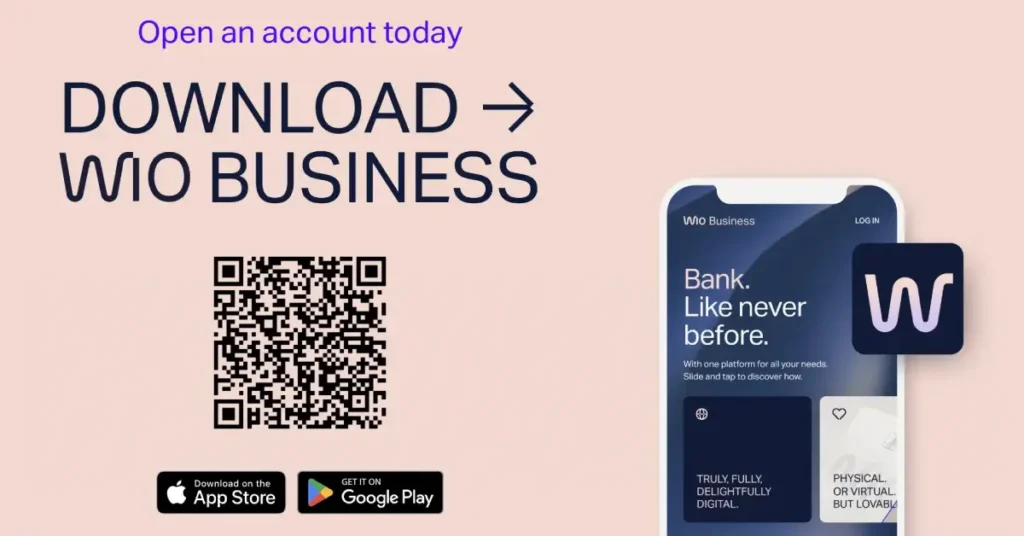
Available on iOS App Store and Google Play. Search for “WIO Business” and download.
Tip: Use GenZone’s referral code C094 for VIP onboarding and free assistance.
Step 2: Start New Application
Open the app and click “Open Business Account”. Choose Free Zone or Mainland company.
Step 3: Enter Your Business Details
- Trade License Number
- Business Name
- Legal structure (LLC, FZC, Sole Proprietorship, etc.)
- Select Business Category & Industry
Step 4: Upload Documents
Take pictures or upload files:
- Trade license
- MOA
- Passport of owner
- Emirates ID (front & back)
Make sure your documents are clear and legible to avoid rejection.
Step 5: Enter Personal Information
- Mobile number linked to UAE
- Email address
- Nationality
- Date of Birth
- Residential address in the UAE
Step 6: KYC Questions
You’ll be asked about:
- Nature of your business
- Expected monthly revenue
- Main suppliers or customers
- Payment flows (local or international)
Be honest and clear. Avoid mentioning high-risk industries like crypto or forex unless licensed.
Step 7: E-Sign and Submit
- Review your information
- E-sign the application digitally
- Submit the form
Step 8: Wait for Approval (Usually 24–48 Hours)
- You’ll get notified by SMS and email when approved
- You’ll receive your IBAN and account access on the app
- Debit card is issued after verification
- Stay in Dubai for at least 5–7 business days to receive your physical card (delivered via courier)
Common Reasons for Rejection
- Vague business description
- Suspicious or blacklisted industries (crypto, forex without license)
- No residency visa or Emirates ID
- Missing or blurry documents
- No active trade license
Subscription Plans with Wio Bank
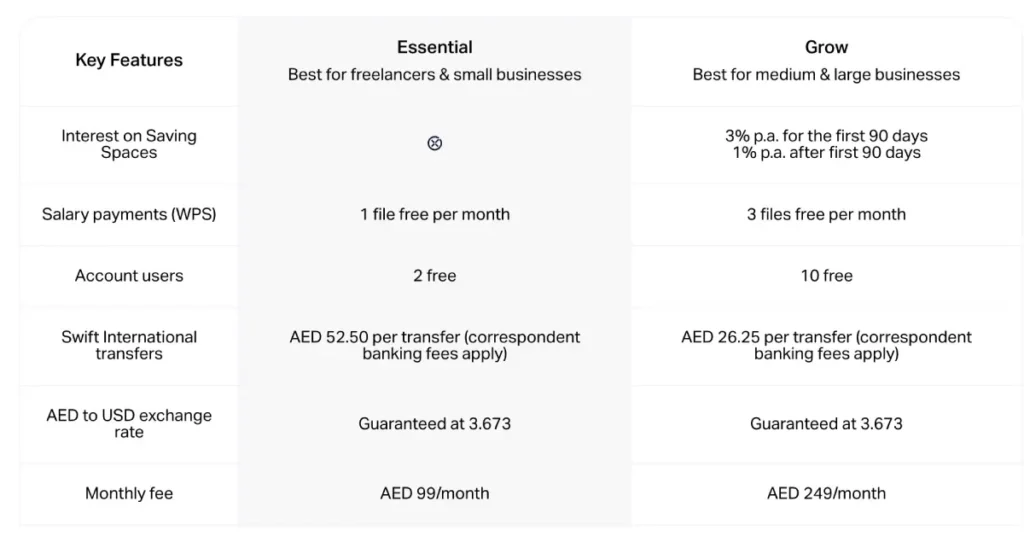
Wio Bank offers two subscription plans: Essential and Grow, both at a remarkably low cost. The table below provides an in-depth analysis of these plans and guides you in selecting the one that aligns with your business requirements.
Monthly Account Fees
- The monthly subscription fee will be charged 30 days after opening your account.
- Start using Saving Spaces on or before March 31, 2024 and earn 3% interest per annum ON THE FIRST 90 DAYS on all Saving Space balances; earn 1% interest per annum thereafter. The interest will be credited to your Saving Space on the first day of the following month.
- Once you upgrade to Grow plan, you can enjoy its benefits immediately. You’ll be charged AED 249 on your next billing cycle date.
Essential Plan includes:
- 1 multi-currency IBAN
- 1 debit card
- Invoicing tools
- No minimum balance required
- Free local transfers within UAE
- International SWIFT support
Features of Wio Bank
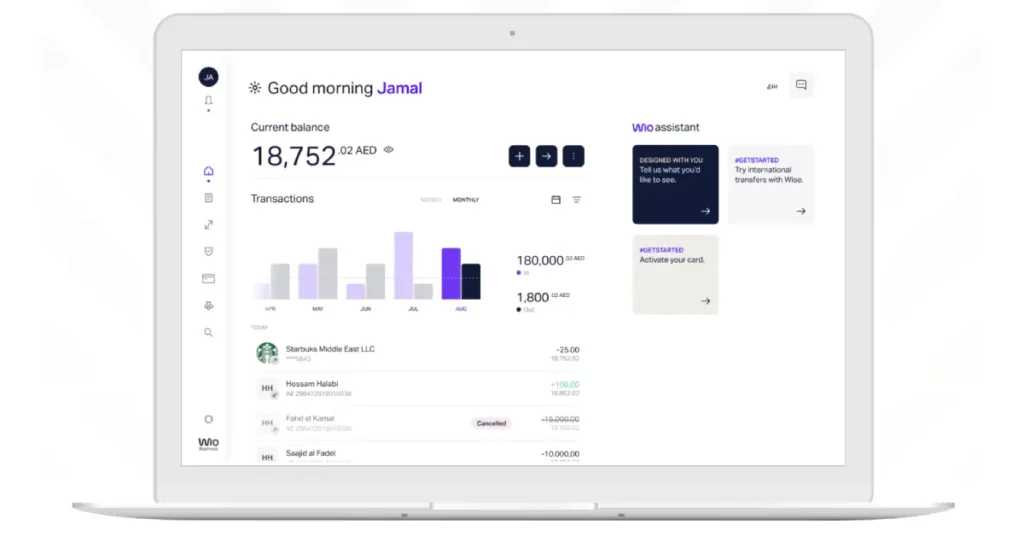
Here’s what you can expect when you open an account with Wio:
1. Multi-Currency Accounts
- Operate in AED, USD, EUR, and GBP.
- Simplify international transactions and manage exchange rates more effectively.
2. Debit Cards & Checkbooks
- Physical debit cards for easy access to funds.
- Checkbooks for business needs, such as paying rent or vendors.
3. Cash Deposit Options
- Deposit cash at any FAB ATM using a code generated from the Wio app.
- Withdraw cash or deposit checks conveniently.
4. Mobile-First Experience
- Manage finances on the go with real-time updates.
- Transfer funds between personal and business accounts seamlessly.
5. Custom Support for Businesses
- 24/7 in-app chat support
- Secure PIN and biometric login
- Expense management tools
- Receipt upload for every transaction
Overcoming Challenges
While Wio Bank has a high approval rate, some applications may face rejections due to incomplete documentation or mismatched requirements. Here’s how we ensure success for our clients:
- Detailed Guidance: We provide step-by-step instructions to meet Wio’s criteria.
- Backup Plans: If your application is rejected, we’ll help you set up an account with another bank in Dubai.
- Personalized Support: Our team works closely with Wio to resolve any issues and ensure your account is fully operational.
Why Choose GenZone for Your WIO Setup?
With over 400 business accounts and 1,000 personal accounts opened successfully, our expertise speaks for itself. We understand the nuances of banking in Dubai and ensure your process is smooth and hassle-free.
Here’s What We Offer:
- Expert advice tailored to your business needs.
- End-to-end assistance with Wio applications.
- Backup plans to guarantee your banking needs are met.
Frequently Asked Questions
Can I deposit cash into my Wio account?
Yes! You can deposit cash into your Wio business account through any FAB ATM. For personal accounts, cash deposits are not directly supported, but you can transfer funds from your business account.
Is Wio suitable for all types of businesses?
Absolutely. Whether you’re in real estate, consulting, or retail, Wio offers tailored solutions to meet your needs.
What if my application is rejected?
Rejections are rare with our clients, but if it happens, we’ll guide you through alternative options and ensure you’re set up with a reliable bank.
Final Thoughts
Your choice of bank can significantly impact your business operations in Dubai. With its government backing, award-winning services, and innovative digital platform, Wio Bank is an excellent choice for entrepreneurs.
If you’re ready to set up your account, don’t leave it to chance. Contact GenZone today for expert assistance, and use our referral code C94 to maximize your chances of success.
Let’s get your business banking journey in Dubai started!